How does Temporal handle application data?
This guide provides an overview of data handling using a Data Converter on the Temporal Platform.
Data Converters in Temporal are SDK components that handle the serialization and encoding of data entering and exiting a Temporal Service. Workflow inputs and outputs need to be serialized and deserialized so they can be sent as JSON to a Temporal Service.
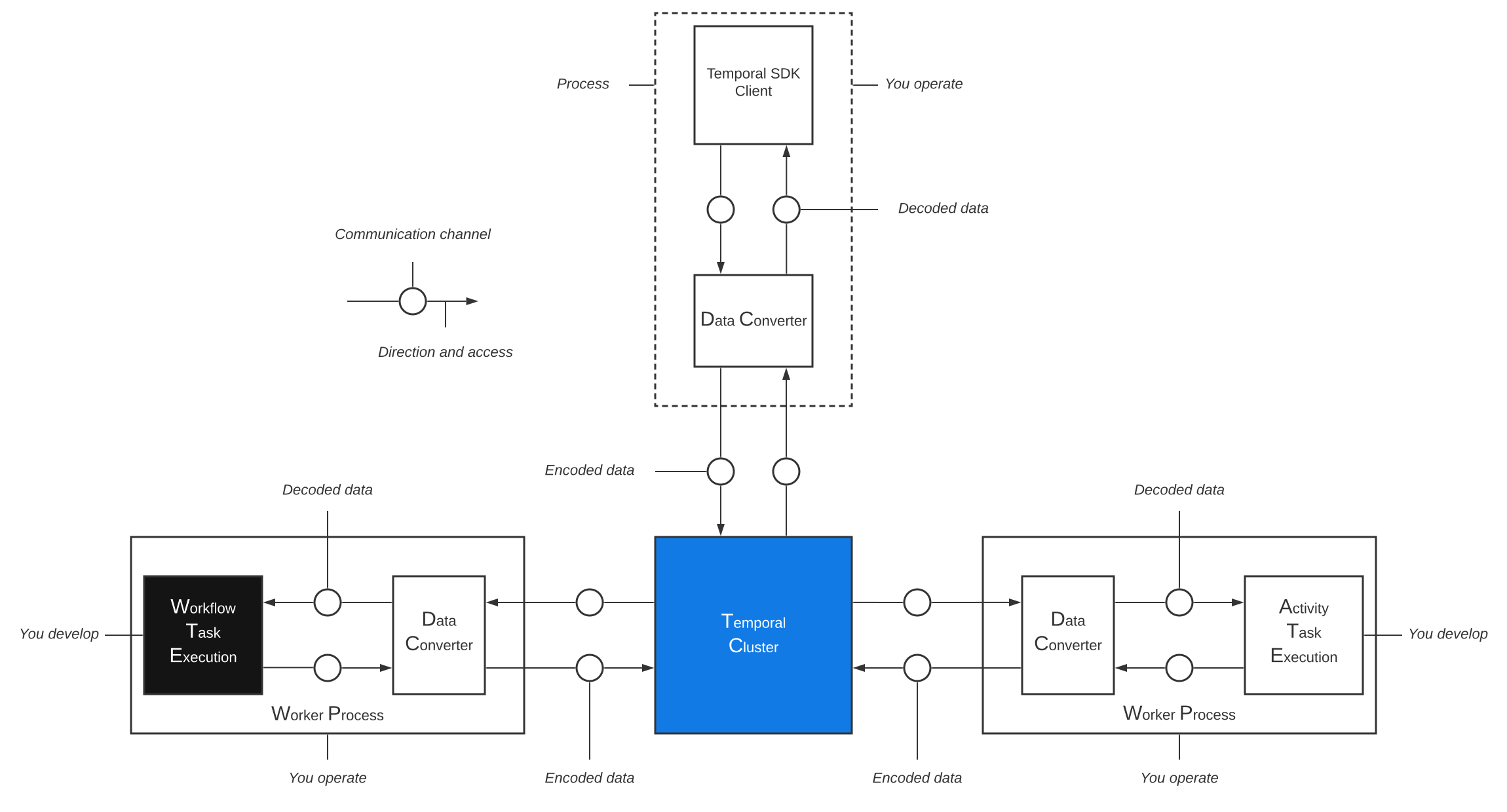
Data Converter encodes and decodes data
The Data Converter encodes data from your application to a Payload before it is sent to the Temporal Service in the Client call. When the Temporal Server sends the encoded data back to the Worker, the Data Converter decodes it for processing within your application. This ensures that all your sensitive data exists in its original format only on hosts that you control.
Each piece of data (like a single argument or return value) is encoded as a Payload, which consists of binary data and key-value metadata.
Components of a Data Converter
A Data Converter has the following layers:
| PayloadConverter | PayloadCodec | ExternalStorage | |
|---|---|---|---|
| Purpose | Serialize application data to bytes | Transform encoded payloads (encrypt, compress) | Offload large payloads to external store |
| Must be deterministic | Yes | No | No |
| Default | JSON serialization | None (passthrough) | None (passthrough) |
The following diagram shows how data flows through a Data Converter:
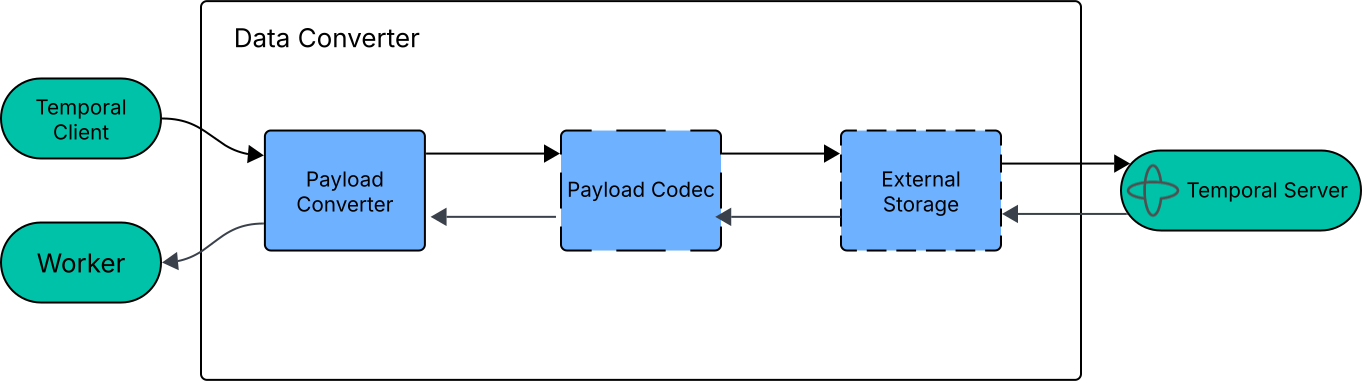
The Flow of Data through a Data Converter
Your application code controls the Temporal Client, which sends data through the Data Converter to the Temporal Service. The PayloadConverter encodes the data first, then the PayloadCodec transforms it, and finally ExternalStorage offloads large payloads to an external store.
When the Temporal Service dispatches Tasks to Workers, the process reverses: ExternalStorage retrieves offloaded payloads, the PayloadCodec decodes them, and the PayloadConverter deserializes them back into application types.
During the entire data conversion process, the Temporal Service never sees or persists the decoded data.
For details, see the API references:
What is a Payload?
A Payload represents binary data such as input and output from Activities and Workflows. Payloads also contain metadata that describe their data type or other parameters for use by custom encoders/converters.
When processed through the SDK, the default Data Converter serializes your data/value to a Payload before sending it to the Temporal Server. The default Data Converter processes supported type values to Payloads. You can create a custom Payload Converter to apply different conversion steps.
You can additionally apply custom codecs, such as for encryption or compression, on your Payloads.
When Payloads are too large for the Temporal Service's ~2 MB limit, you can use External Storage to offload them to an external store like S3 and keep only a reference in the Event History.