External Storage
The Temporal Service enforces a 2 MB per-payload limit. When your Workflows or Activities handle data larger than this limit, you can use External Storage to offload payloads to an external store (such as S3) and pass a small reference token through the Event History instead. This is called the claim check pattern.
For SDK-specific implementation details, see:
How External Storage fits in the data pipeline
External Storage sits at the end of the data pipeline, after both the Payload Converter and the Payload Codec:
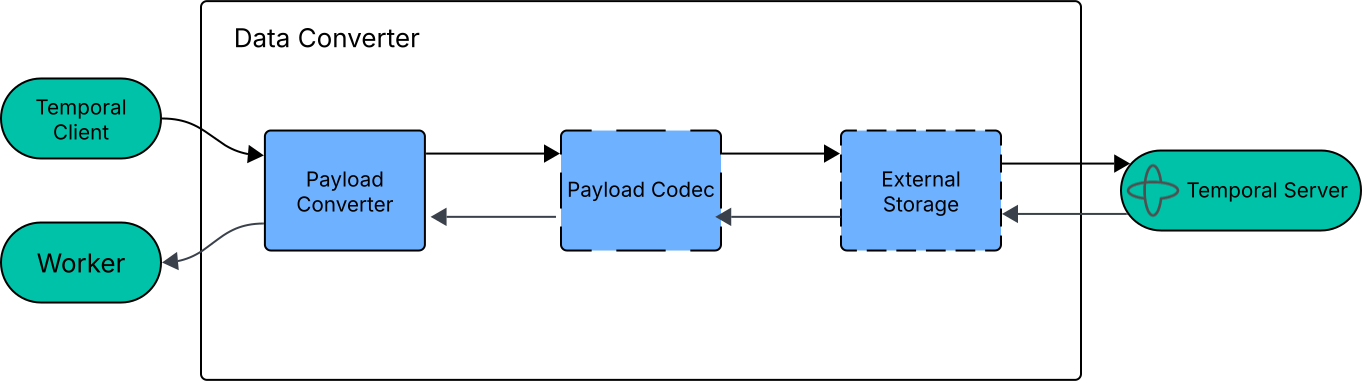
The Flow of Data through a Data Converter
When a Temporal Client sends a payload that exceeds a configurable size threshold, the storage driver uploads it to your external store and replaces it with a lightweight reference. Payloads below the threshold stay inline in the Event History. When the Temporal Service dispatches Tasks to the Worker, the Worker retrieves the reference payloads from external storage and loads them into memory to execute the Task.
Because External Storage runs after the Payload Codec, if you use an encryption codec, payloads are already encrypted before they're uploaded to your store.
Storage drivers
A Storage Driver is the part you implement to connect External Storage to your backing store. Each driver provides two operations:
- Store. Upload payloads and return a claim, which is a set of key-value pairs the driver uses to locate the payload later.
- Retrieve. Download payloads using the claims that
storeproduced.
You can configure multiple storage drivers and use a selector function to route payloads to different drivers based on size, type, or other criteria such as hot and cold storage tiers.
Configuration
Configure External Storage on the Data Converter. The key settings are:
- Drivers. One or more storage driver implementations.
- Size threshold. The driver offloads payloads larger than this value, which typically defaults to 256 KiB. Turn off the threshold to externalize all payloads regardless of size.
- Driver selector. When using multiple drivers, a function that chooses which driver handles each payload.